
9:16 vs 16:9: Which Aspect Ratio Should Your AI Videos Use?
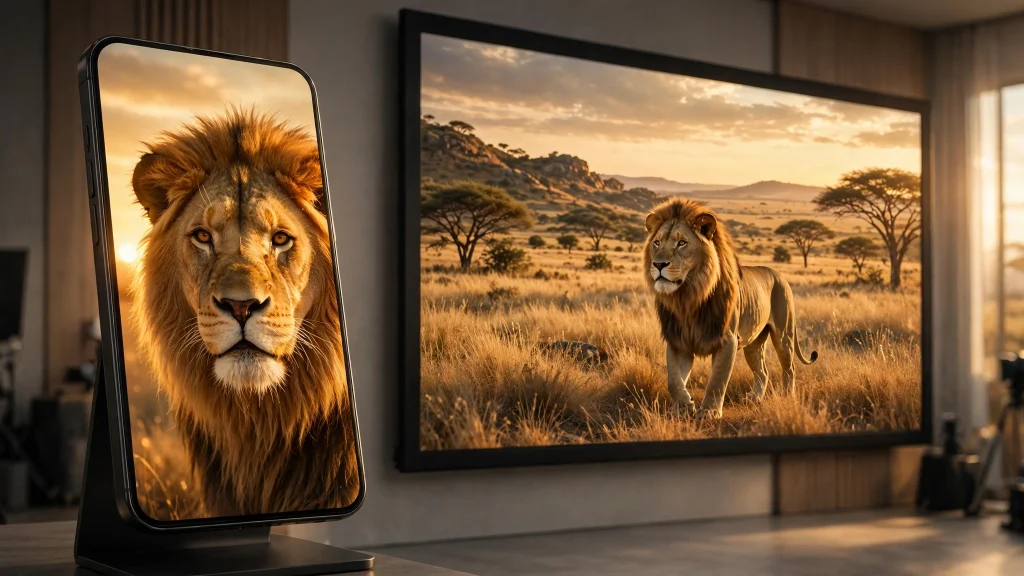
Table of Contents
- Why the Ratio Matters More Than the Camera
- What 9:16 and 16:9 Actually Mean
- Where 9:16 Wins
- Where 16:9 Wins
- The 5 Ratio Mistakes That Ruin AI Videos
- How to Plan One Video for Both Ratios
- Quick Decision Table
- Frequently Asked Questions
- Final Thoughts
Why the Ratio Matters More Than the Camera
A perfect prompt in the wrong shape still looks wrong. Generate a wide cinematic shot and post it as a Reel, and the platform crops the sides off — your subject loses half its body. Generate a tall vertical clip and post it as a YouTube long-form video, and it arrives with thick black bars on both sides, looking like a mistake.
The aspect ratio is the first decision a video makes, before the subject, before the camera, before the style. It decides how much of the frame your subject gets, which platform will show it properly, and whether a viewer watches or swipes past in the first second. Yet most beginners never write it in the prompt at all — and then blame the tool when the clip comes back in the wrong shape.
What 9:16 and 16:9 Actually Mean
The numbers are a width-to-height ratio.
9:16 is vertical. Nine units wide, sixteen tall — the shape of a phone held upright. The standard size is 1080 × 1920 pixels. It fills a phone screen completely, which is how most people watch video today.
16:9 is horizontal. Sixteen units wide, nine tall — the shape of a television, a laptop, and a YouTube player. The standard size is 1920 × 1080 pixels. It is the default shape of long-form video.
There is also 1:1 (square, 1080 × 1080), the old feed-post shape, and 4:5 (1080 × 1350), a taller feed shape for Instagram. Both still appear, but they are compromises — neither fills a phone screen nor a television. For most creators, the real choice is only between 9:16 and 16:9.
The rule from the earlier guides applies here too: the ratio belongs in the prompt itself, not added afterwards. “Photorealistic, 9:16 vertical, 10 seconds” is a complete finishing line. Without it, the generator picks its own default — and its default is rarely the one your platform needs.
Where 9:16 Wins
Vertical video wins everywhere the phone is the screen and the thumb is the remote.
Shorts, Reels, and TikTok are 9:16 platforms. A vertical clip fills the whole screen; a horizontal clip shrinks into a small window with dead space above and below. In a feed where the next video is one swipe away, a clip that fills the screen holds attention longer — and retention is what the algorithm rewards.
Vertical also wins for close subjects. A single person talking, one animal, one object, one face — vertical framing puts the subject large in the frame and removes the empty space on the sides. A lion’s face, a chef’s hands, a baby animal: all of them read bigger and clearer in 9:16 than in 16:9.
The one exception: a vertical video with a wide scene inside it. A mountain range, a city skyline, a herd running across a plain — these need width, and forcing them into a tall frame means cropping away the very thing that made the scene worth filming. If the scene is wider than it is tall, vertical is the wrong choice even on a vertical platform.
Where 16:9 Wins
Horizontal video wins everywhere the screen is wide and the viewer sits down to watch.
YouTube long-form is 16:9. A ten-minute video in vertical shape plays as a narrow strip in the middle of the player, with black bars on both sides. Viewers read that as an error and leave, even if the content is good. For anything over a minute, 16:9 is the only serious option on YouTube.
Wide scenes need width. Landscapes, skylines, herds, storms, two people talking across a table — any scene with two things that matter at once needs horizontal space. In 9:16, one of them gets cropped out, and the scene loses its meaning.
Desktop and television viewing is horizontal. Facebook Watch on a laptop, a video embedded in a blog, a clip played on a TV — all of these are 16:9 spaces. A vertical video there looks small and unfinished.
The short version: short and close goes vertical; long and wide goes horizontal.
The 5 Ratio Mistakes That Ruin AI Videos
Mistake 1: Generating in one ratio and cropping to the other
This is the most common ratio mistake, and the most destructive. A 16:9 clip cropped to 9:16 keeps only the middle third of the frame. Heads get cut, animals lose their legs, and the camera movement — which was composed for a wide frame — turns into a pan across nothing.
Fix: generate in the ratio you will publish. Cropping is a rescue, not a plan. If you need both ratios, generate twice (see the section below) — never crop once and hope.
Mistake 2: Mixing ratios inside one series
A series where episode one is vertical, episode two is horizontal, and episode three is square looks unfinished. Viewers who liked the first episode cannot tell the next one is the same series, and the channel page looks disorganised.
Fix: one ratio per series, per platform. A Reels series is all 9:16. A YouTube long-form series is all 16:9. The ratio is part of the series identity, like the voice or the colour palette.
Mistake 3: Ignoring the safe zone
Every platform draws its own interface over your video: the like and comment buttons on the right, the caption at the bottom, the profile name at the top. Text or a subject placed in those zones gets covered.
Fix: keep the subject and any text in the centre 80% of the frame. In 9:16, that means nothing important in the bottom 15% (captions live there) or the right 10% (buttons live there). In 16:9, the corners are usually safe, but the bottom edge is where the player controls appear.
Mistake 4: Using 1:1 as a compromise
Square video feels like a safe middle ground — it works everywhere, badly. On a phone it does not fill the screen, on a television it has bars on both sides, and on a feed it looks dated. The platforms moved on from square years ago; the only place it still makes sense is a feed post that must also work as a profile grid thumbnail.
Fix: pick a side. If the video is short, go 9:16. If it is long, go 16:9. A compromise ratio pleases no platform.
Mistake 5: Forgetting the ratio in the prompt
This is Mistake 6 from the earlier prompt-mistakes guide, repeated here because it is the single most common cause of wrong-shaped videos. A prompt with no ratio gets the generator’s default, and the default is usually 16:9 — which is exactly wrong for the Reels and Shorts most beginners are making.
Fix: the finishing line from the 5-part formula — “Photorealistic, 9:16 vertical, 10 seconds” — belongs on every prompt. Three words, one habit, and the wrong-shape problem disappears.
How to Plan One Video for Both Ratios
Sometimes one idea genuinely needs both shapes: a vertical Short to pull viewers in, and a horizontal long-form video to keep them. The wrong way is to generate once and crop. The right way is to generate twice, with the same prompt changed in exactly one place.
Step 1: Write the full prompt once, with the subject, action, camera, and ending. Keep everything identical in both versions.
Step 2: Change only the ratio line. Version A ends with “Photorealistic, 9:16 vertical, 10 seconds.” Version B ends with “Photorealistic, 16:9 horizontal, 10 seconds.”
Step 3: Generate both. The two clips will not be identical — the generator recomposes for each shape — but they will share the subject, the action, and the look, which is what matters for a series.
Step 4: Use each clip where it belongs. The vertical one is the Short, the Reel, the TikTok. The horizontal one is the YouTube video, the Facebook Watch clip, the embedded player.
This costs one extra generation, and it is the cheapest way to own both platforms. Cropping costs nothing and loses everything.
Quick Decision Table
| If your video is… | Use this ratio | Because… |
|---|---|---|
| A Short, Reel, or TikTok | 9:16 | Fills the phone screen; the algorithm expects it |
| A YouTube video over 1 minute | 16:9 | Fills the player; vertical looks like an error |
| One person, animal, or face | 9:16 | The subject reads larger in a tall frame |
| A landscape, skyline, or herd | 16:9 | Wide scenes need width |
| A Facebook feed post | 9:16 | Most Facebook video is watched on phones |
| A video on your own website | 16:9 | Desktop and laptop screens are horizontal |
When in doubt, ask one question: where will this video be watched? Phone in hand means 9:16. Screen on a desk means 16:9.
Frequently Asked Questions
Can I convert a 16:9 video to 9:16 without losing quality?
You can, but you lose the sides of the frame — about two-thirds of the picture. The quality of what remains is fine; the problem is what gets cut. A subject that was framed for a wide shot rarely survives a vertical crop. Generate in the right ratio instead.
Does the aspect ratio affect views?
Not directly — no platform ranks a video higher just for being vertical. But a vertical video on a vertical platform fills the screen, holds attention longer, and gets better retention, and retention is what the algorithm does reward. The ratio works through retention, not through a ranking bonus.
What about 1:1 square video — is it dead?
Almost. It survives in two places: feed posts that also appear in a profile grid, and ads that must fit several placements at once. For organic video in 2026, square is a leftover, not a strategy.
Which ratio should I use for Facebook?
Most Facebook video is watched on phones, so 9:16 wins for Reels and feed video. For Facebook Watch on a laptop, or a video you embed elsewhere, use 16:9. If you only make one version, make it 9:16 — that is where the audience is.
Do AI video tools support both ratios?
Most do, but the setting is often a dropdown, not part of the prompt — and some tools default to 16:9 even when you write 9:16 in the text. Check the tool’s ratio setting before you generate, and put the ratio in the prompt as well, so both agree.
Final Thoughts
The ratio is not a technical detail. It is the first creative decision, and it decides the platform, the framing, and whether the viewer stays. Short and close goes vertical; long and wide goes horizontal. One ratio per series, the ratio written in every prompt, and two generations instead of one crop when you need both shapes.
Get the ratio right and everything after it — the subject, the camera, the ending — has a frame it can actually fill. If you want starting points already built on these rules, browse the free prompts on PromptVilla — and create a free account to save the ones that work for you.